ChatGPT to PDF Converter
Copy an answer from ChatGPT, paste it here and save a clean PDF with typeset formulas, tables and code, on the paper you choose. Nothing is uploaded.
Your browser's print dialog opens. Choose Save as PDF as the destination.
Markdown
Preview
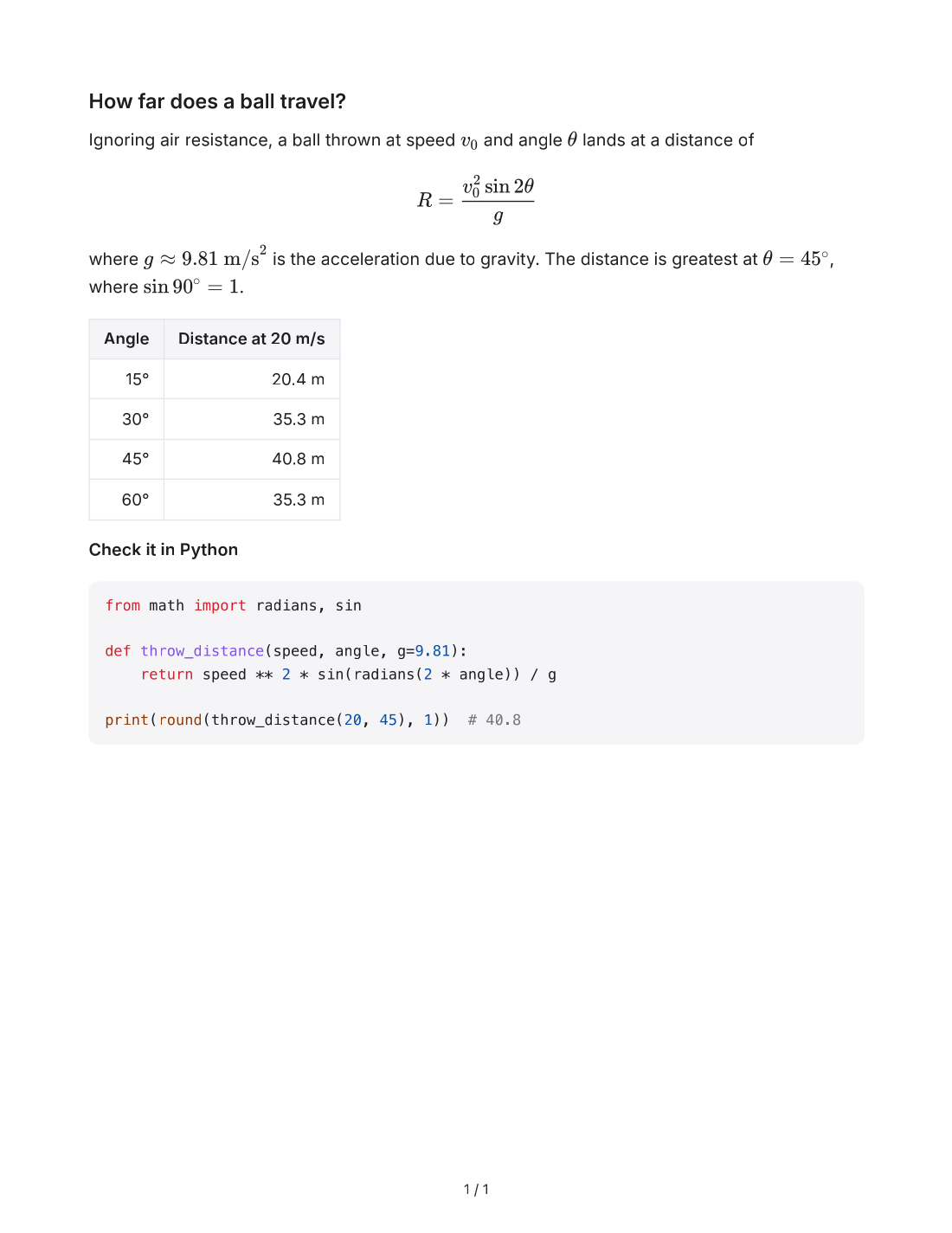
Ignoring air resistance, a ball thrown at speed and angle lands at a distance of
where is the acceleration due to gravity. The distance is greatest at , where .
| Angle | Distance at 20 m/s |
|---|---|
| 15° | 20.4 m |
| 30° | 35.3 m |
| 45° | 40.8 m |
| 60° | 35.3 m |
Check it in Python
from math import radians, sin

def throw_distance(speed, angle, g=9.81):
    return speed ** 2 * sin(radians(2 * angle)) / g

print(round(throw_distance(20, 45), 1))  # 40.8
How to save a ChatGPT answer as PDF
Copy the answer
Click the copy button under the ChatGPT answer. Answers from Claude, Gemini and DeepSeek copy the same way.
Set up the page
Paste into the box, then pick the paper size, margins and text size. The preview shows the page at its real width.
Save as PDF
Click Save as PDF and choose Save as PDF as the destination in the print dialog.
ChatGPT to PDF, before and after
The sample answer was copied with ChatGPT's copy button and printed to PDF by Chrome with the default settings. The formulas are typeset, the table and the Python code keep their layout, and the 【4†source】 mark is removed.
### How far does a ball travel?

Ignoring air resistance, a ball thrown at speed \(v_0\) and angle \(\theta\) lands at a distance of

\[
R = \frac{v_0^2 \sin 2\theta}{g}
\]

where \(g \approx 9.81\ \text{m/s}^2\) is the acceleration due to gravity. The distance is greatest at \(\theta = 45^\circ\), where \(\sin 90^\circ = 1\).【4†source】

| Angle | Distance at 20 m/s |
| ----: | -----------------: |
| 15° | 20.4 m |
| 30° | 35.3 m |
| 45° | 40.8 m |
| 60° | 35.3 m |

**Check it in Python**

```python
from math import radians, sin

def throw_distance(speed, angle, g=9.81):
    return speed ** 2 * sin(radians(2 * angle)) / g

print(round(throw_distance(20, 45), 1))  # 40.8
```
What it handles
- Formulas typeset as math
- Formulas ChatGPT writes as
\( … \)and\[ … \]are typeset as math and stay sharp when you zoom in. - Only the answer
- The PDF holds the answer you pasted and nothing else: no sidebar, buttons or message box around it.
- Text you can select
- The PDF keeps real text, so you can search it and copy from it, and links stay clickable.
- Citation marks removed
- Marks such as 【4†source】 and Gemini's
[cite: 1]are taken out before the page is laid out. - Paper, margins and page numbers
- A4, US Letter, Legal, A3 or A5, portrait or landscape, with the margins and text size you pick. Chrome and Edge print page numbers.
- Code and tables that fit
- Code blocks keep their syntax colors and wrap long lines inside the page, and tables keep their columns.
What ChatGPT writes and how it looks in the PDF
A copied ChatGPT answer is Markdown with a few habits of its own. Each of them is laid out for the page before you save.
| In the answer | Copied text | In the PDF |
|---|---|---|
| Formulas in a sentence | | A typeset formula inside the line |
| Formulas on their own line | | A typeset formula, centered on its own line |
| ChatGPT citations | | Removed |
| Gemini citations | | Removed |
| Headings | | A heading that stays on the same page as the text after it |
| Tables | | A table with its column alignment; no row is split across two pages |
| Code | | Syntax colors, with long lines wrapped inside the page |
| Several answers | | On a line of its own, starts the next answer on a new page |
Questions and answers
How do I save a ChatGPT answer as a PDF?
Why does a print dialog open?
Can I save several answers in one PDF?
\newpage on a line of its own, with an empty line before and after it, where the next answer should start on a new page.Does it work with Claude, Gemini and DeepSeek?
[cite: 1] marks are removed the same way as ChatGPT's citations.Can I save the PDF on a phone?
Is my conversation uploaded?
Related tools
- ChatGPT to WordTurn a copied ChatGPT answer into a .docx with editable equations.
- Markdown to PDFSave a PDF with selectable text, formulas, highlighted code and page numbers.
- Markdown to Plain TextRemove #, ** and backticks and keep lists, links and tables readable.
- Markdown to WordDownload an editable .docx with Word headings, tables and equations.
- Markdown to HTMLClean, safe HTML for a site or blog, or a complete styled page.
- Markdown to Rich TextCopy formatted text that pastes into Google Docs, Word and email.